
Your business name carries trust. DMARC helps email systems check messages claiming to come from your business, even if your website never sends email.
“But our website doesn’t send emails.”
It doesn’t have to.
Your website might simply describe your services and give people a phone number. You might never send newsletters or automated messages to customers.
Someone can still send an email that appears to come from your business. They use their own system to send it and put your business’s address in the “From” field. They do not need your website to send the message, or access to your mailbox.
The risk comes from someone pretending to be your business, even if you never email customers yourself.
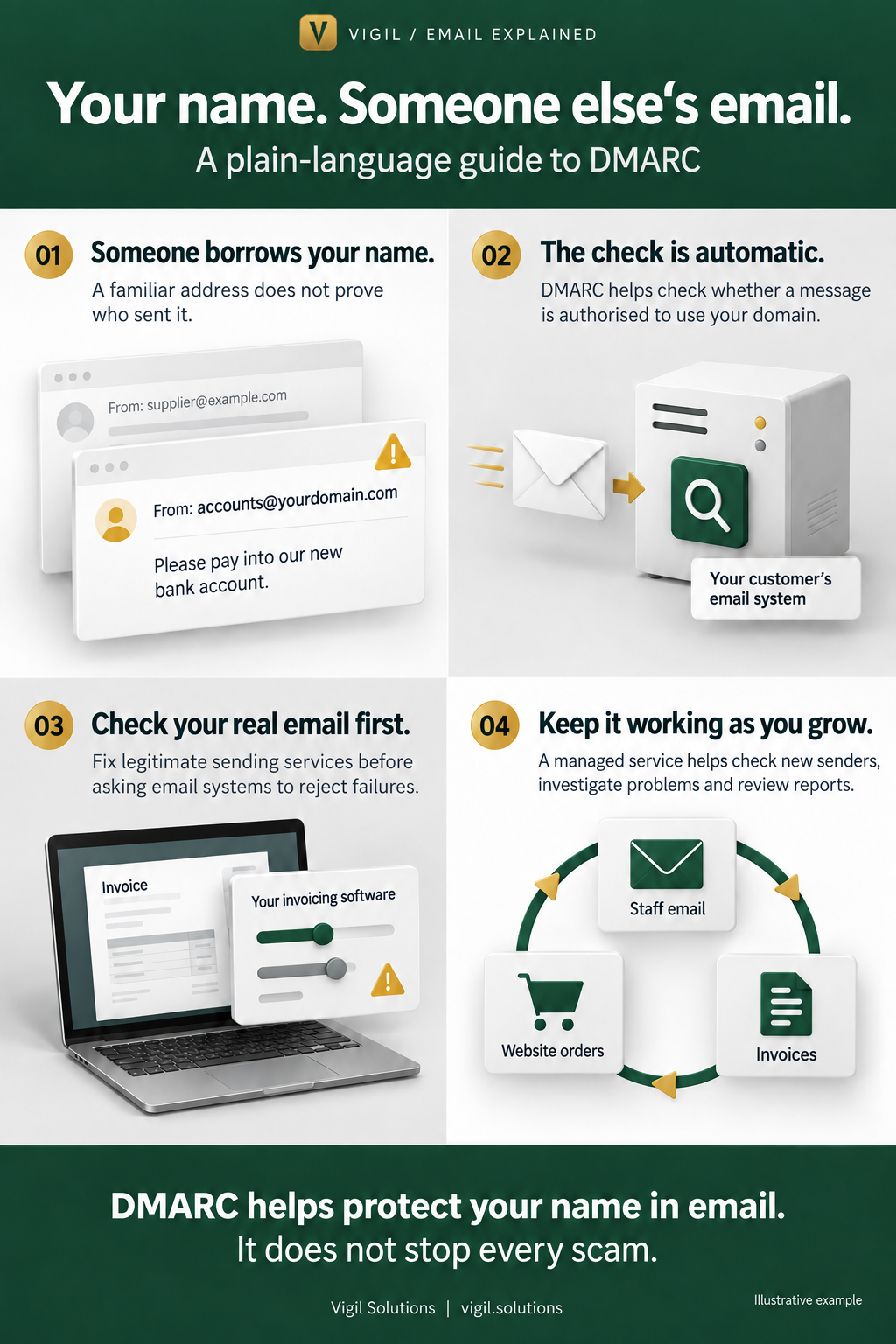
Your name. Someone else’s email.
Imagine a customer receives this message:
From: accounts@yourdomain.com
Please pay your invoice into our new bank account.
They recognise your business’s address. They were expecting an invoice. The request seems believable.
But your business never sent it.
Someone has forged the address shown on the message. They may have done this without breaking into your email account.
It is rather like putting your company’s name on a fake letterhead. The name looks familiar, but it does not prove who wrote the message. DMARC.org explains this problem.
For your customer, that could mean paying the wrong person. For your business, it could mean a payment dispute, time spent investigating and a difficult conversation about trust.
 Vigil Solutions · vigil.solutions
DMARC helps check who is using your name
First, one useful word: domain.
If your email address is accounts@yourdomain.com, your domain is yourdomain.com, the part after the @ sign.
DMARC is a standard that email systems use to check whether a message is authorised to use that domain.
Your IT provider sets up the necessary information for your business. When a message claiming to come from you arrives at a customer’s email provider, that provider can check it automatically.
Your customer does not need to install anything.
Your business can also ask receiving systems to put messages that fail the check into spam, or refuse them. Each receiving provider makes the final decision about how to handle a message. How the DMARC standard works.
The aim is to make it harder for someone to pass off an email as coming from your business.
Vigil Solutions · vigil.solutionsWhat if we never use our domain for email?
Even a domain used only for a website can be impersonated in email. Other email providers do not automatically know that your business never sends messages using that name.
For a domain that genuinely sends no email, your IT provider can publish settings that effectively say: “No email is authorised to come from this domain. Please reject messages claiming otherwise.” Guidance on protecting domains that do not send email.
First, they should check that no staff mailbox or business service uses it. A website that sends no email is not necessarily a business that sends no email.
Your real email needs to pass the check too
If your business does send email, your staff’s mailboxes may be only part of the picture.
Your business might also send:
- Invoices from accounting software.
- Order confirmations from your website.
- Appointment reminders from a booking service.
- Newsletters from a marketing service.
Each service sending as your business needs the right setup.
Imagine your accounting software sends a genuine invoice, but its settings do not establish its permission to use your domain. That message could fail the check too.
A failed check does not automatically mean a criminal sent the email. It can also mean a legitimate service needs attention. Why businesses need to check their sending services.
That is why setting up DMARC properly involves understanding how your business actually sends email.
Vigil Solutions · vigil.solutionsStart by watching what happens
DMARC can begin in monitoring mode.
At this stage, your business can collect reports without asking receiving systems to block messages because they fail DMARC.
Those reports help answer questions such as:
Which services are sending with our domain? Which are passing the checks? What needs investigating?
Someone then identifies the legitimate services and helps correct their settings. Once the evidence supports it, your business can ask receiving systems to apply stronger handling to messages that fail. Guidance on introducing DMARC gradually.
So, “we have DMARC” is only part of the answer. It matters how it is configured and whether anyone is reviewing what it shows.
Why does it need ongoing management?
Because the way your business sends email changes.
Suppose you move to a new invoicing service. The old service was correctly set up, but that does not automatically carry over to the new one.
Someone needs to check the new service, help arrange the right settings and review the results once it starts sending.
The same applies when you introduce a newsletter, change website providers or add another business tool.
DMARC’s summary reports provide evidence about messages using your domain and whether they passed the checks. They do not contain the text of your customers’ emails, and they do not cover every message everywhere. What DMARC summary reports contain.
Those reports still need interpretation. An unfamiliar sender might be a forgotten business service, a setup problem or an attempt to impersonate you.
Vigil Solutions · vigil.solutionsWhat does a managed DMARC service do?
A managed service gives someone responsibility for this continuing work.
It should help you:
- Understand your domains and sending services: establish which domains should send email, which should not, and which services belong to your business.
- Resolve problems: work with your IT or software providers when legitimate messages fail.
- Introduce stronger protection carefully: review the evidence before changing settings.
- Keep track of changes: investigate unfamiliar activity and check new services.
You should receive an explanation you can act on: what is working, what needs attention and who needs to do what.
A capable internal IT team can manage DMARC. A managed service is useful when your business needs the specialist knowledge, time and continuing attention that the work requires.
When comparing services, ask: “If a problem appears, who investigates it and helps us put it right?”
What DMARC cannot promise
DMARC helps protect the use of your actual domain.
It cannot stop every scam. Someone could use a similar-looking address, copy your company name or send messages from a genuine account they have broken into. It also cannot guarantee that every legitimate message reaches the inbox. DMARC’s limits.
Your staff and customers should still question unusual requests, especially changes to payment details.
A simple place to start
You do not need to learn the technical settings before taking action.
Ask whoever looks after your business email:
“Are all our business domains protected, including ones we don’t use for email, and who is keeping an eye on them?”
Vigil helps service providers identify legitimate sending services, correct their setup and introduce stronger DMARC protection carefully.
Contact Vigil to discuss where your business stands and what support you need.
View the complete illustrated guide · Explore the technical guides